
ChargEV FleX on iPhone Duo: quite good was not good enough
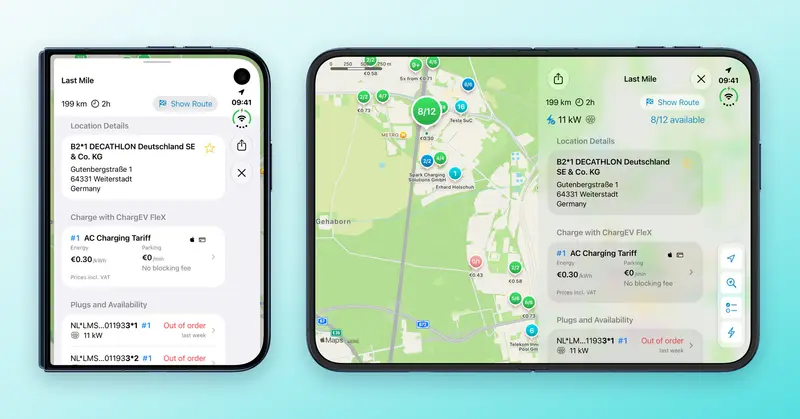
Unfolded, iPhone Duo is essentially an iPad as far as an app is concerned. That worked in our favour: ChargEV FleX has been using the full width on iPad for a long time, with the map on one side and the station on the other. So when we first built the app for iPhone Duo, it already looked quite good.
As CEO, I could have said: it works, next topic. As a developer, I could not.
So we took a close look at what makes iPhone Duo different and reworked parts of the app. Version 1.0.4 uses the full inner display, and your station, checkout and charging session stay open when you fold or unfold it.
One app, two presentations
ChargEV FleX shows a station in two ways. On iPhone it sits in a panel over the map. On iPad it is a column beside the map, with the price, the connectors and the surroundings in view at once.
iPhone Duo is both. Folded it is an iPhone, unfolded it is closer to an iPad, and the switch happens in your hand, in the middle of using the app. To make that feel natural, both presentations now share the same map and the same state. Which station is open, which tariff and chargepoint you picked in the checkout and how your charging session is doing all simply come along when you fold.

Then there are the details you only see once you take a new device seriously. The side column is wider, the map controls sit at the edge of the display the way Apple recommends for iPhone Duo, and when you fold, the panel opens at the right height straight away. iPad gets the improvements as well.

What else is new
Even without an iPhone Duo, the app gets better:
- Search. With a filter on, Nearby in Search now lists only matching stations, just like the map.
- Dark mode. On iOS 27, the iPad side panel, the checkout and charging sessions are easier to read.
- iPad. Charging Sessions took two taps to close. Now it takes one.
- Moving. Move to a new iPhone by backup or Quick Start and your charging history comes along. We extended the backend for this in early November, with no app update needed.
If you have an iPhone Duo, unfold it next time you charge, ideally in the middle of the checkout. And tell me how it feels: chargev@ev-freaks.com.
ChargEV FleX works without an account, a subscription or a base fee; you pay with Apple Pay or a credit card.

Not installed yet? Take a look at ChargEV FleX and download it.